
This week’s ELH Challenge was to present content using lightbox slides. A lightbox slide is similar to a pop-up window that displays important information without requiring the user to navigate away from the current slide.
With this challenge, I also wanted to create an ending scene that appeared once all lightbox slides had been shown. Here’s how I did it.
Lightbox Slides
Each lightbox pop-up was created as a new slide. Utilizing Storyline’s lightbox feature in the triggers section, I was able to create a trigger that displayed a lightbox slide when the corresponding button group was pressed.
Ending Slide
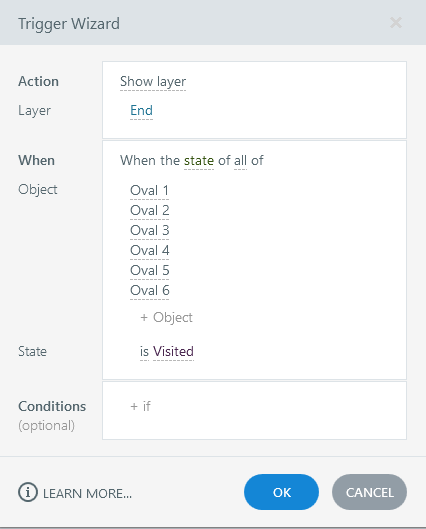
As each button group was pressed, the ‘+’ buttons (ovals behind the plus icon circle) changed states from ‘Normal’ to ‘Visited.’ I created a layer on the original slide for the ending scene. Once all button groups change to the state ‘Visited’, the ending layer appears. I attempted to put a transition animation on the ending layer, but this caused Storyline to glitch. The layer never fully appeared, and the screen went blank. Removing this animation caused the ending layer to work as intended.
 Kelsey Corder
Leave a comment