
This week’s ELH Challenge was to create content using accordion interactions. An accordion interaction is similar to tabs, however the content shrinks and expands as the user clicks each area to explore.
With this challenge, I also wanted to create a button that appeared once all levels of the accordion interaction had been visited. Here’s how I managed to get everything to work.
Accordion Interaction
The accordion piece itself was made of layers. Each number was a different layer. In the layer, I could adjust the size of the colored rectangles and add in the content text as well as change the pose of the characters. Each number has a hotspot rectangle over it that, when clicked, opens the corresponding layer.
Got it! Button
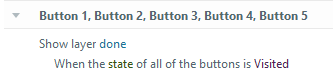
Once all pieces of the accordion interaction were visited, I wanted a button to appear that would send the user to a concluding screen. To do this, I added five invisible buttons to the scene that correspond to the five layers in my accordion interaction. In each layer, I created a trigger that changed the status of the corresponding button to ‘Visited’ when the timeline started on that layer. Then, once all the buttons had been changed to ‘Visited’, the Got it! button layer (done) appeared.

 Kelsey Corder
Leave a comment